Driver's License Photo Requirements
Quick read - for people in a hurry
- Your driver’s license photo is usually taken at the DMV.
- Proof of ID (passport or state ID) uses a 2 × 2 inch photo.
- Neutral expression, face centered, eyes open; no hats, glasses, or shadows.
- Background must be plain white or light-colored.
- Religious/medical head coverings are allowed if the face is fully visible.
- If your state allows you to bring your own photo, use Smartphone iD to take compliant ID photos at home and get expert approval.
If you’re applying for a driver’s license for the first time, make sure you understand the photo requirements. This article explains everything you need to know.
Last update: 09/30/2025
Table of Contents
- What Are the Driving License Photo Requirements?
- When do I Need an ID Photo for a Driving License?
- Who Takes Your Photo for a Driving License Application?
- How to Take Driving License Photos With Your Phone?
- Summary
- FAQ
What Are the Driving License Photo Requirements?
In most cases, when you go to get a driver's license, your photo will be taken for you by the DMV (Department of Motor Vehicles). However, you still need to provide proof of identification when applying for a driver's license.
This proof of identification can be:
- A valid passport
- A state-issued ID card
- Birth certificate (plus additional documents)
- Social Security card (plus additional documents)
Photo Requirements for ID Documents
All forms of photographic identification in the United States must conform to certain regulations. Whether you're taking a photo for a passport, state ID, or International Driving Permit (IDP), make sure your ID photo meets these standards:
Size
- 2 × 2 inches in size (51 × 51 mm)
- Head centered, measuring between 1 inch and 1 3/8 inches (25-35 mm) from chin to top of head
Quality
If you're taking your own photo for an ID document, make sure the photo is clear and sharp. There should be no pixelation, blurriness, or printing errors. The photo must be:
- In color
- Taken within the last 6 months
- Printed on high-quality photo paper (matte or glossy finish)
Background
- Plain white or off-white background
- No patterns, shadows, or other people visible
- Even lighting with no harsh shadows on your face
Appearance
When taking your own photo, you need to make sure your appearance is compliant with United States regulations:
- Your face needs to be fully visible in the photo
- There should be no deep shadows or bright light obscuring your face
- Head coverings and hats are not allowed, except for medical or religious reasons
- Glasses are allowed only if they don't cause glare and frames don't obscure your eyes
- Remove accessories that obstruct facial features
Posture and Expression
For a U.S. ID photo, you need to have the correct posture:
- Keep a neutral expression with your mouth closed
- Face the camera directly and center yourself in the frame
- Keep your eyes open and clearly visible
- Look straight at the camera
When You Need Smartphone iD
While the DMV takes your driver's license photo on-site, you may still need compliant photo IDs for:
- Proof of identity when applying (passport, state ID)
- International Driving Permits (IDP) if you plan to drive abroad
- State ID cards (if your state allows home photos)
If you use our app 'Smartphone iD', you can have peace of mind knowing that our experts will pre-approve your document photos.
How it works:
- Take photos with the app using step-by-step guidance
- Advanced AI and human experts verify your photos comply with official guidelines
- Receive your compliant ID photos digitally via email
- Print at home or use our professional printing service
Smartphone iD guarantees your photos will be accepted—or your money back.
When do I Need a Photo for a U.S. Driving License?
A photograph is required for all US driver's licenses and is taken at the Department of Motor Vehicles (DMV) or motor vehicle office during your visit. You cannot submit your own photos for a US driver's license—the DMV takes your photo on-site as part of the application process.
You will need to have your photo taken at the DMV when:
- Applying for a learner's permit or first-time driver's license.
- Renewing your driver's license in person (required periodically, typically every 4-12 years depending on the state, to update your photograph).
- Replacing a lost or damaged license.
- Upgrading to a REAL ID-compliant license.
- Exchanging a foreign license for a US driver's license (available to new residents, not short-term visitors).
Important notes:
- Each state has different requirements for when in-person renewal with a new photo is required
- Some states allow online or mail renewal if your photo is still current
- The photo is taken by DMV staff using their equipment—you cannot bring your own photo
- If you're eligible, you may be able to apply for a driver's license from the state you are in. However, this is not available to short-term visitors
International Driving Permits (IDP): If you need an International Driving Permit to drive abroad, you will need to provide passport-style photos with your application. When you choose our app for IDP photos, we guarantee secure and fast service. If your photos are rejected, we will refund you.
Who Takes Your Photo for a Driving License Application?
Once you’ve passed all the necessary tests for your driving license application, you’ll go to get your photo taken at a DMV (Department of Motor Vehicles) location. You may have been given a non-photo provisional licence beforehand.
In this case, you will hand in your provisional licence and receive a driving licence photo in the mail.
How to Take Driving License Photos With Your Phone?
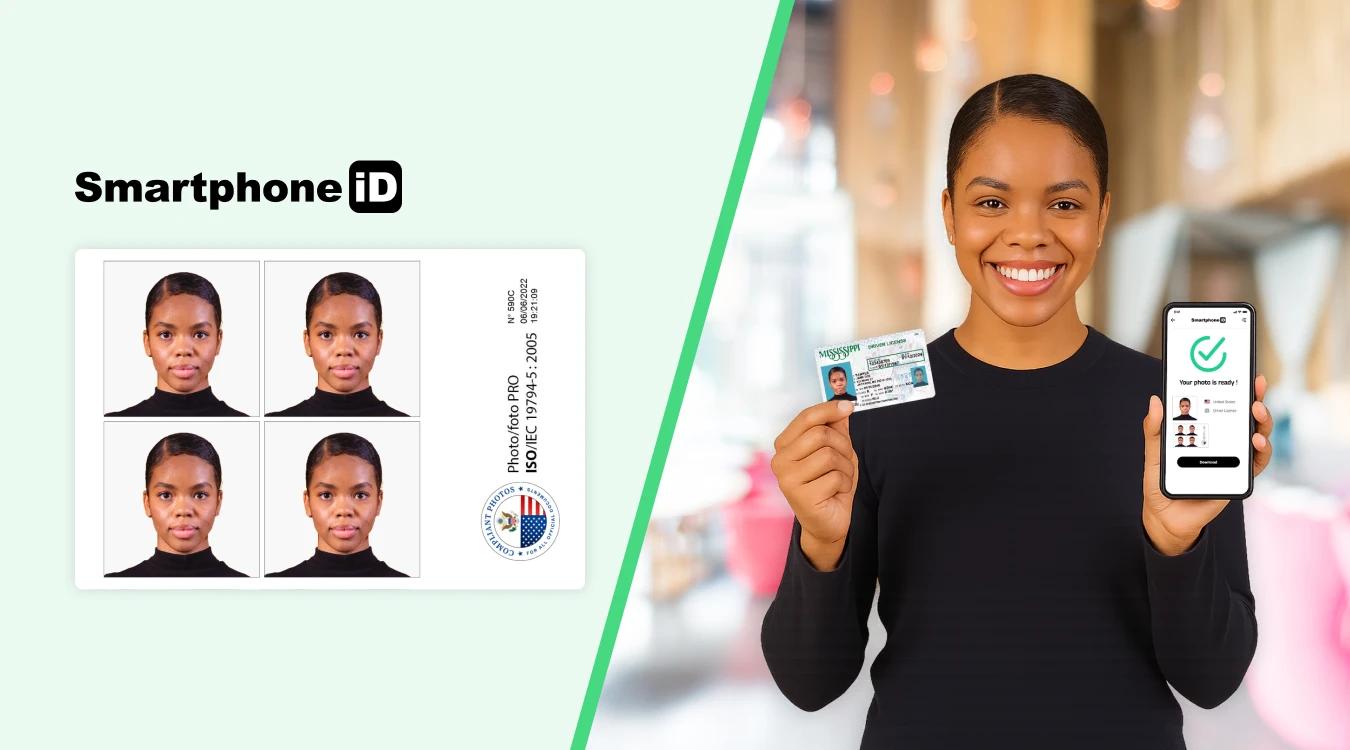
Note: Most US states require you to have your driver's license photo taken at the DMV. However, some states may allow you to submit your own photo for certain types of applications or renewals. If your state allows driver's license photos taken at home, you can take the perfect driver's license photo with our app.
Here’s how to use our handy app Smartphone iD :
- Use our online photo tool for quick and easy ID photos by clicking the “Take a Photo” button.
- Select which country you want to produce an ID photo for (USA)
- Select which document you want the photo for ( driving license)
- In no time at all, get photos digitally via email, once our experts have checked them. You can use these digital copies to print them yourself. Alternatively, you can use our printing service to make it even easier
Regardless of whether you need to exchange a foreign license, apply for an IDP or just get a United States driving license photo, Smartphone iD can make pre-approved document photos for any country.
Driving License Photo Tool - Our Pro Tip
The Department of State's photo tool is designed for passports and visas, but it can also help you prepare a compliant ID-style photo if your state allows you to bring your own driver's license photo.
This photo tool can give you pointers when it comes to taking an ID photo. Remember, you need a photo identification document to apply for a driver's license.
Steps on how to use the online photo tool:
- Upload a photo to the photo tool by clicking the 'Choose New Photo' button at the bottom of the page.
- Click through the headings (Size and Position, Pose and Expression, etc.) to find out how to make your photo compliant.
- The Department of State's photo tool will automatically crop your photo.
- Click 'Accept & Proceed' if you're ready to continue.
- Click 'Download image to your device' to get a digital copy of your cropped photo.
Important limitations
While this tool can be helpful if your state allows you to bring your own photo for a driver's license application, it only gives you guidelines—it doesn't actually verify that your photo is compliant with official requirements.
Why choose Smartphone iD instead?
If you use our app, your photo will be checked by advanced AI software and certified by human experts when you send it to us. This dual verification process ensures your photo meets all official requirements, giving you peace of mind and reducing the risk of rejection.
Summary
Driving for the first time can be scary and exciting! While most US states require you to have your driver's license photo taken at the DMV, some states allow you to bring your own photo for certain applications or renewals. Take some of the weight off your shoulders by preparing in advance with Smartphone iD.
If your state allows submitted photos, or if you need identification documents for your driver's license application, use 'Smartphone iD' to ensure your photo meets all requirements. Plus, Smartphone iD is perfect for International Driving Permits (IDP) if you plan to drive abroad.
Smartphone iD is secure, quick, and affordable. What's not to like?
FAQ
Do you have to show your ears in a driver’s license photo?
No, most states do not require your ears to be visible in a driver’s license photo. However, your face must be fully visible, so your hair or accessories should not cover your eyes, nose, or mouth.
What is the background color required?
Most states require a plain white or off-white background for a driver’s license photo. Some DMVs may allow a light gray or blue background, but it’s best to check with your local DMV.
Can you take your own driver’s license photo?
In most cases, your driver’s license photo must be taken at the DMV or licensing agency. However, some states are starting to allow online license renewals with photo uploads.
Can you wear glasses in a DMV photo?
No, you must remove glasses for a driver’s license photo, even if you wear them daily. This rule ensures that there are no reflections or distortions that could affect facial recognition systems.
Can I wear a hat, headband, or head covering?
No, hats, headbands, and non-religious head coverings are not allowed in driver’s license photos. However, religious and medical head coverings are permitted as long as they do not obscure your face. You may need to provide documentation if wearing one for religious or medical reasons.
How should my hair be styled?
Your hair should be styled away from your face, ensuring that your full facial features are visible. Avoid covering your eyes, eyebrows, or ears with hair.
Where is my driver’s license photo taken?
Your driver’s license photo is usually taken at the DMV or licensing agency when you apply for or renew your license. However, if your state allows driver’s license photos to be taken at home, you can take them yourself using our online ID photo service.
What color should I wear for a driver’s license photo?
It’s best to wear darker or solid colors that contrast with the background. Avoid wearing white or light colors that may blend in with the background.
Can I wear makeup or jewelry in my driver’s license photo?
Yes, natural makeup and minimal jewelry are allowed, but makeup should not significantly alter your facial features. Avoid large, reflective jewelry or accessories that could cause glare.
What are the California driver’s license photo requirements?
California follows standard DMV photo rules:
- Plain white or light-colored background
- No hats, sunglasses, or non-religious head coverings
- Glasses must be removed
- A neutral or slight smile is allowed
- The face must be fully visible with no shadows or obstructions
Can you smile in a driver’s license photo?
Yes, you can generally smile in a US driving license photo, but there are a few things to keep in mind:
Type of smile: A slight, natural smile is usually acceptable, but some states may not allow a wide, toothy grin. Aim for a relaxed, subtle smile.
State-specific rules: Each state might have its own guidelines about facial expressions in driver’s license photos. Check your state’s DMV website for detailed information to ensure you follow their specific requirements.
Facial recognition: Some states use facial recognition technology for driver’s licenses. In these cases, they may require a neutral expression to ensure accurate scanning and identification.
If you’re unsure about the rules in your state, it’s best to play it safe and go with a subtle smile or a neutral expression.
When did the U.S. start putting photos on driver’s licenses?
Most states introduced photo licenses in the 1980s, making photo IDs relatively recent.
What photo ID can I use for a driving licence?
To apply for a driving licence in the United States, you need a photo ID. This can be a:
- Valid Passport
- Valid ID Card
Both of these forms of ID use a 2-inch x 2-inch photo.
What size is a digital driving licence photo?
Digital photos must be 600 × 600 pixels minimum, 1200 × 1200 pixels maximum.
Do you need a photo to renew your driving licence?
If you are renewing via mail, you do not need a new photo. However, if the DMV requires you to attend in person, they will take your picture.
Can I use my driving license photo for a Passport?
No. Although both use 2 × 2-inch photos, passport photos must meet stricter requirements.
Sources
https://dmv.de.gov/DriverServices/drivers_license/secureID/index.shtml
https://dmv.colorado.gov/press-release/say-cheese-coloradans-can-now-smile-for-driver-license-photos
https://www.lorealparisusa.com/beauty-magazine/makeup/makeup-looks/prevent-makeup-flashback


.bbc9bc36.svg)